
In Week 6, you’ll learn how to manage orders from start to finish — reviewing customer orders, confirming payments, and using Tend Reports to track your farm’s performance.
Expected hours this week : 4 hrs
Set Up Payment Processors
Goal: Connect your payment accounts so you can accept and capture customer payments through your Online Store and Offer Sheets.
Settings → Commerce & Payment Processors
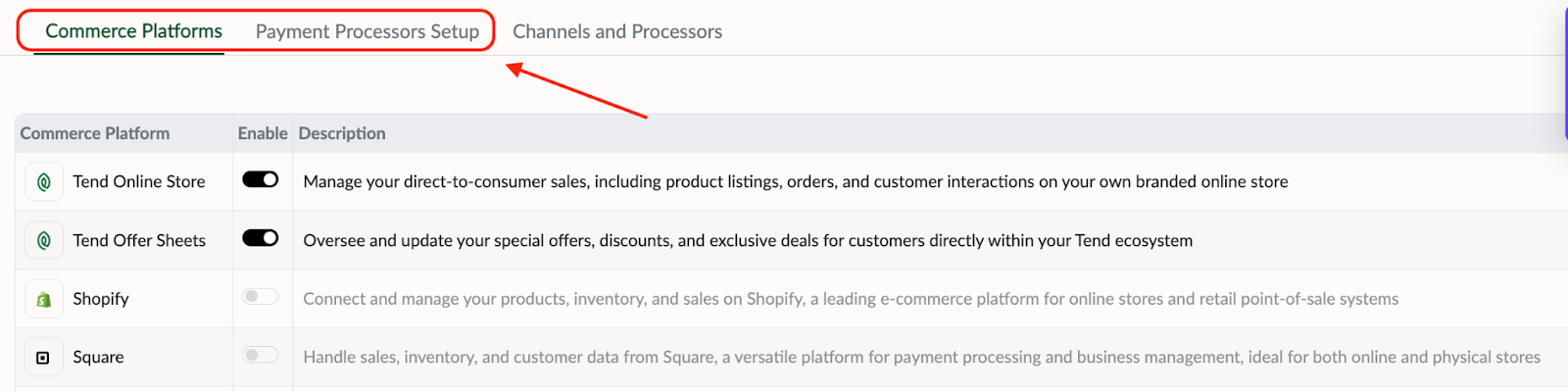
Commerce Platforms:
Toggle Enable for the channels you plan to sell through:
Tend Online Store
Offer Sheets
Shopify
Square
Payment Processors:
Choose your preferred processor and toggle Enable:
Stripe – flexible capture window (7–30 days)
2.0 Tip: This Processor is preferred when using the Tend online store.
Square – fixed 7-day capture window
Shopify Store – syncs directly with Shopify checkout
Note: Check your capture settings in your Online Store/Offer Sheet settings - A capture window is the allowed time frame between an authorization and the actual capture (settlement) of a payment.
Critical Connection: Payments “capture” automatically once you mark an order as Packed in Tend.
Small Win: Your sales channels are now payment-ready — customers can check out seamlessly through Stripe, Square, or Shopify.
Resources : Commerce & Payment Processors
Manage Your Orders
Goal: Review, fulfill, and track all customer orders in one place.
The Orders feature unites sales from your Online Store and Offer Sheets — giving you a clear view of every sale, its status, and fulfillment progress.
View and Sort Orders:
Go to: Sell → Orders
Filter by sales channel, customer, delivery date, or status. Customize columns and save filtered views (like “Today’s Deliveries” or Pending Payment”).
Critical Connection: Orders sync automatically from Offer Sheets and Online Store — no manual entry needed.
2.0 Tip: Use tabs (All, Unfulfilled, Unpaid) and saved filters for quick daily views
Add or Edit Orders:
If you need to enter orders manually Click: Add Order
Enter packed products for the order
Add customers, delivery details, and payment terms.
Fulfill Orders:
Pack Items for Orders
Click Pack Products or View Packed History
Note: Currently you don’t have the ability to unpack an order so take your time when packing the items
Link Product Harvests for Organic Traceability
Packing products involves linking to Inventory, so make sure you’ve got products in stock before you pack orders. Check out the Inventory help doc here!
Mark items as packed or delivered — statuses sync automatically with Pack Manager. Add internal notes for your team.
Use Batch Packing tool for when you’ve got many orders to pack in a day (only available with certain subscription levels)
Invoices & Payments:
Select unpaid orders and click Send Invoice. Mark orders as Paid when payment is received.
Tags & Notes:
Use tags (e.g., phone-order, market-pickup) or add internal notes to organize communication and workflows.
Archive & Export:
Archive completed or canceled orders to keep your dashboard tidy. Export order lists, raw data, or product sales summaries for accounting or delivery tracking.
Small Win: You now have a complete view of all your farm’s orders – from online sales to wholesale – in one streamlined dashboard!
Resources : Orders | Traceability | Inventory and Lot Management
Reports: Track Sales Performance
Goal: Use Tend Reports to understand what’s selling, where, and when — so you can plan smarter.
Reports give you real-time insight into sales performance, customer behavior, and product trends.
Go to: Reports & Analytics.
Explore available report types:
Sales Orders & Actual Revenue by Customers
Sales Orders & Actual Revenue by Crop
Export to PDF for accounting and team review.
Small Win: You’re now using real data to make informed business decisions.
Resources : Reports & Analytics