
What is Traceability?
Simply put, it's about having the ability to trace the journey of any food item, from its origin as a seed to its final sale. Tend provides a comprehensive, integrated solution for traceability in agriculture. Every step, from seed to sale, is documented, ensuring easy access to data that promotes transparency, accountability, and compliance.
How Tend Enhances Traceability
Seed and Origin
Seed Details: Tend allows for detailed logging of each seed, including its type and source. This establishes a clear starting point for the produce.
Location Details: Every planting is mapped to a farm location. This establishes a detailed lineage for each crop, offering you a clear, historical footprint of both the location and its associated plantings.
Growth, Maintenance, and Farming Practices
Detailed Logs: Tend’s crop plan creates your tasks, and as you follow the plan and complete each task such as watering, fertilizing, and pest control, records are automatically stored. This provides a transparent, step-by-step view of your crop’s journey from seed to sale, ensuring you have a clear traceability record for every crop. Tend makes it easy to track all actions, simplifying compliance and reducing paperwork so you can focus on farming.
Harvest and Storage
Harvest Recording: Tend simplifies the harvest process by ensuring every detail is captured directly from the field. With Harvest Tasks, farmers can meticulously record yields, harvest times, and conditions for each crop. This system allows for real-time updates, enabling a seamless transition from field to storage. By documenting each step of the harvest, Tend ensures that nothing is overlooked, from the quantity harvested to the specific team members involved. This level of detail not only enhances traceability but also aids in planning and efficiency for future harvests.
Containers: Tend supports the organization and tracking of produce through specific storage containers. Each container can be distinctly labeled using a printed QR code or Barcode and its location recorded, making it easy to trace each batch of produce back to its storage point. Whether it's identifying the type of produce, the harvest date, or the storage conditions, Tend's Containers feature fosters an organized and efficient post-harvest workflow, ensuring produce is stored correctly and ready for the next step, whether that be sale, processing, or further distribution.
Sale and Distribution
Sales Logs: For every sale, Tend logs transaction details. Within the Orders Feature, each order displays traceability logs, offering insights into the produce's journey from harvest to sale.
Review Traceability Record of a Sold (and Packed) Item
Click on Orders.
Select an Order.
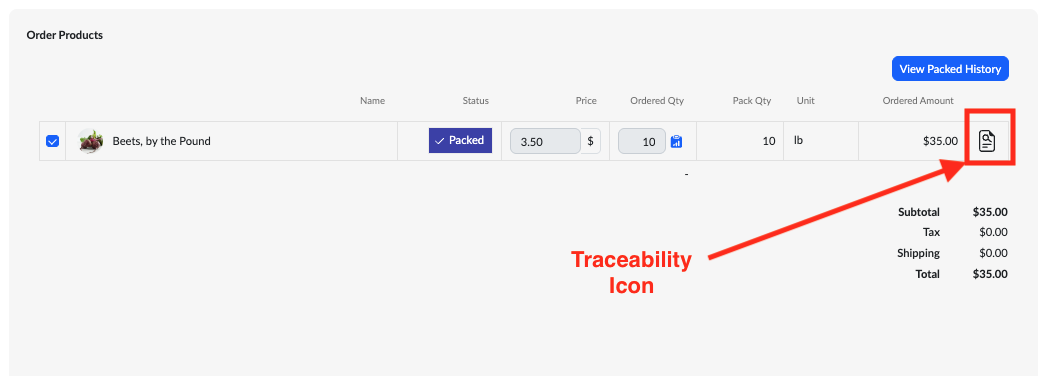
For a given line item in the Order Products section, scroll to the right and click the traceability icon.
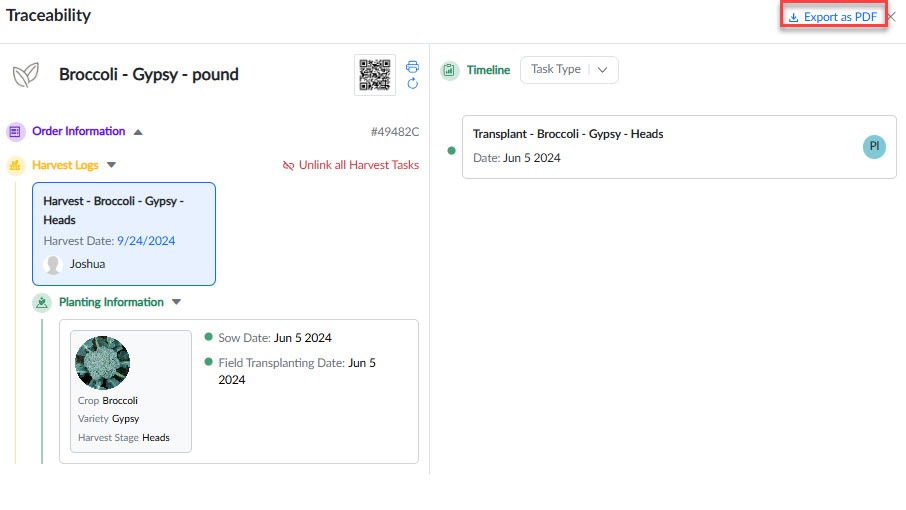
This record shows everything that has happened to the plant throughout its journey, provided it’s been recorded in Tend. You’ll see:
Order Info: Customer, Email, Phone, Address, Packed Date, Pick Up Location.
Logs: Sow Date, Transplant Date, and Harvest Dates.
Planting Info: Inputs and Location details.
Tasks: All relevant planting, transplant, and harvest activities.
All activities related to this plant from seed to sale are available if recorded along the way. You can also download/print a PDF of this traceability timeline.
Crop Plan
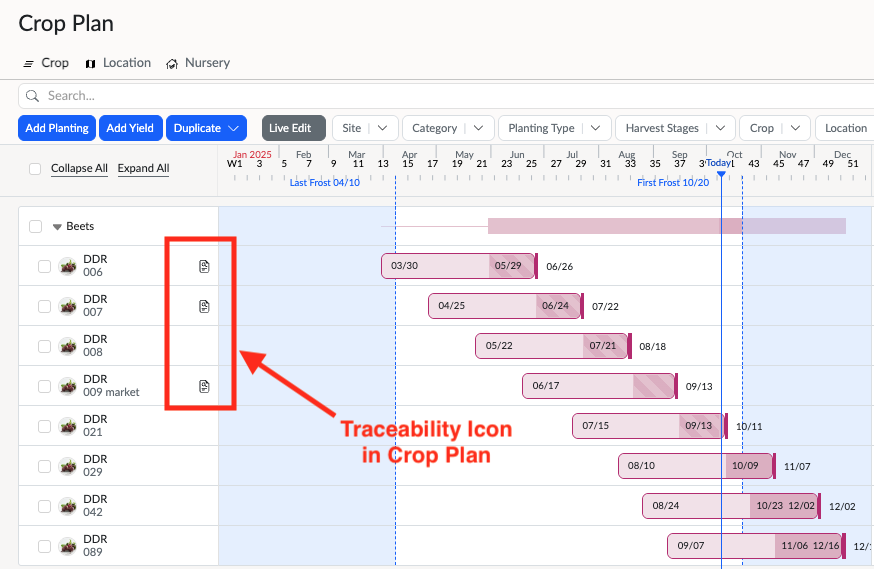
You can also view Traceability through your Crop Plan, Crop View. If there are any orders associated with a planting, the traceability icon will appear next to the variety name. Clicking into this traceability icon will give you the full list of orders that are connected to the harvests coming from this particular planting.
Traceability is essential for both certifications and accountability. Keeping your task list current ensures that all activities are accurately documented and easy to verify. Make sure your crew knows how to enter Actual Harvest Yields and mark tasks as Complete once finished. This step is crucial — completed tasks automatically become Records in your Tend account, providing reliable documentation for your operation.