
In Week 3, you’ll build your personalized Crop Library by creating Growing Templates for your crops, so future plantings auto-fill with tasks and schedules to save you time.
Expected hours this week: 3-4 hrs
Tell Us How YOU Grow (Crop Library)
Goal: Build your personalized crop encyclopedia and Growing Templates for smooth, automated crop planning.
Prep Work
Review the Crop Library overview
Review Task Templates guide
Note: Tasks are an essential part of your Growing Templates, learn the basics now before you dive in
2.0 Tip: Go to Settings > Task Type Management to customize the tasks you see, what they’re called, and more! Set up your tasks to reflect the language on your farm. For example, you could change the “Aerate Field” task to “Broadfork”, and you can make only the 10 tasks you want to use visible and hide the rest!
Set Up Your Crop Library
Add a Crop Key for each crop you grow
2.0 Tip: Use the import hub to quickly add all of the crops you grow, simply download the CSV template, fill it out, and upload back into Tend!
Note: A Crop Key will exist for each combination of crop, variety, and harvest stage, so don’t forget to add each harvest stage for a crop that you may grow in multiple ways (baby, mature, and microgreens for example)
Create Growing Templates for 2-3 of your most common crops.
Time Check: Don’t feel overwhelmed by how long the first template takes to make- you can clone (copy) templates to other crops grown similarly to save time
Note: Cloning is available for crops with the same harvest stage and planting type (direct sow, greenhouse sow)
Critical Connection: These Growing Templates are the recipe book for your plantings, so all information you input here will be auto populated into each new planting you create in your crop plan
Define key details (planting, tasks, yields, etc.)
2.0 Tip: Perennial crops management just got a serious upgrade in 2.0- check out the multiyear pricing feature and task management for your perennial crops
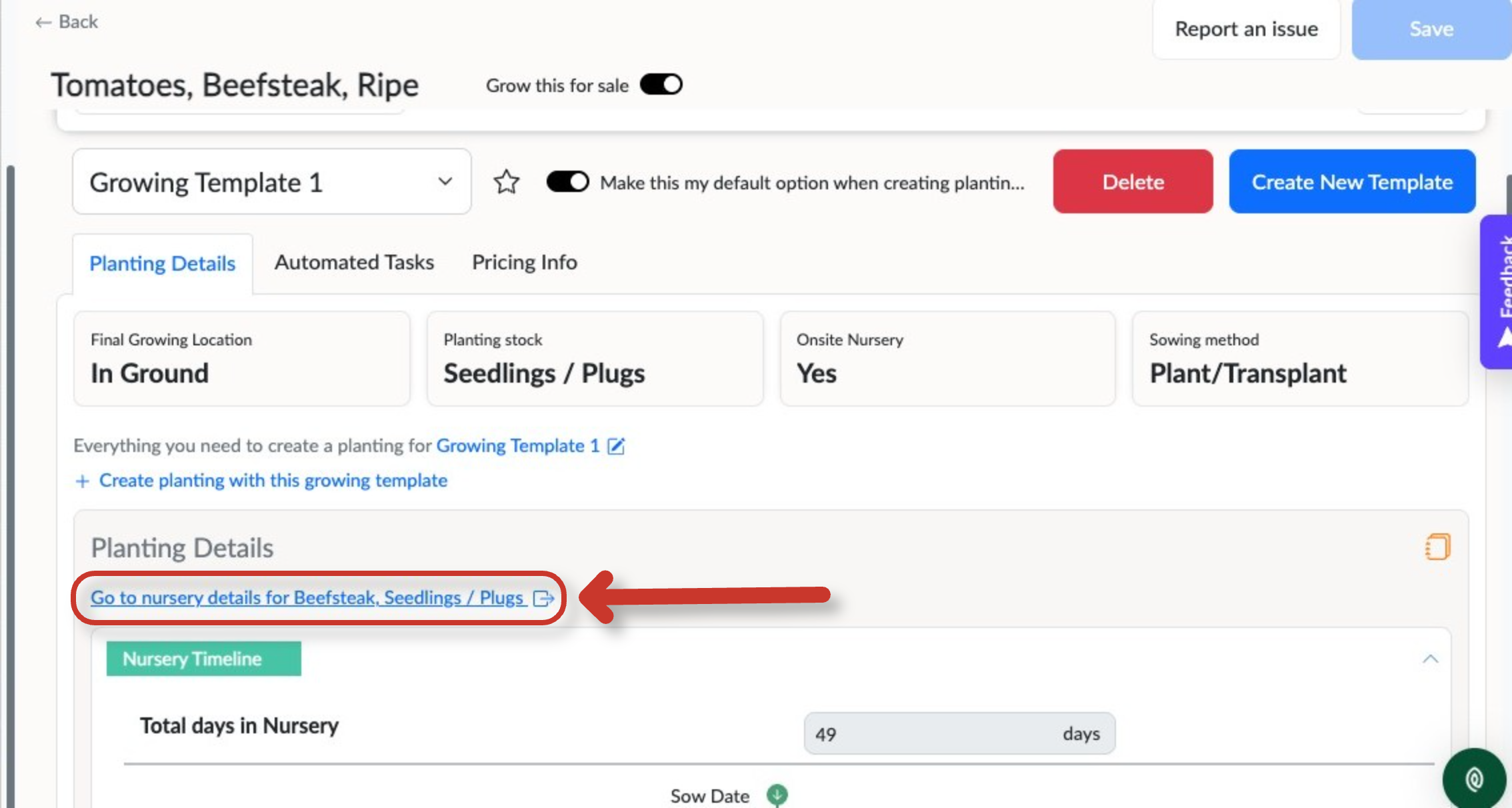
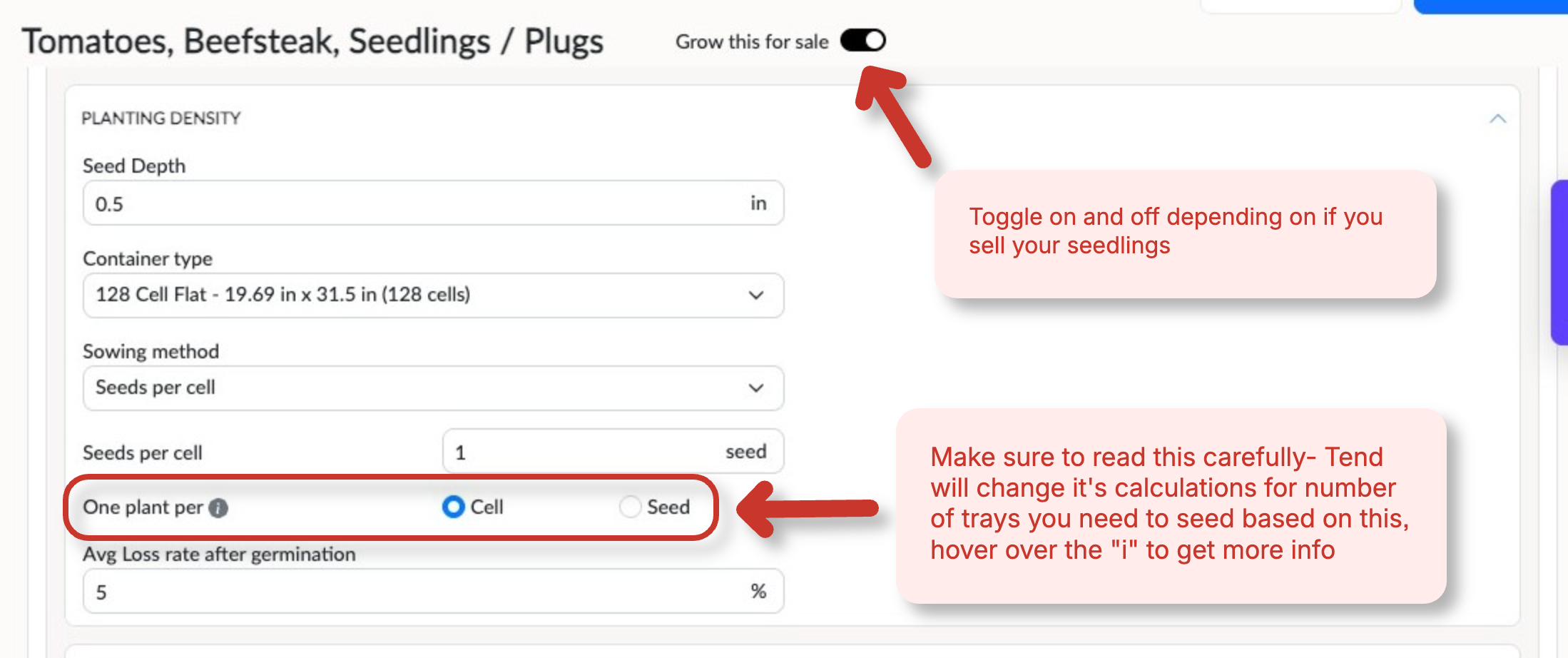
2.0 Tip: In Tend 2.0, nursery plantings and field plantings are now treated as separate but linked plantings if you have a greenhouse and transplant step to your planting. When you add a growing template to a crop that includes a transplant step, Tend will automatically create a growing template for the seedling of that crop if you start the seedlings yourself. It’s very important to make sure to configure this seedling growing template as well, especially specifying the tray size and number of seeds per cell, as Tend will use this to calculate seeds and trays needed for the planting.
From your full size growing template, you can click “Go to Nursery Details”, which will open a new window with your seedling growing template.
Make sure to check the Planting Density section of your seedling template- this will be how Tend determines how many trays you need to seed for your Container Sow tasks
Note: All Growing Templates come with a sowing task and harvest tasks, but you can add all sorts of Automated Tasks here that you need for each crop - set them to daily, weekly, or monthly recurrences, so that when you create a planting, these tasks will appear on your calendar exactly when you need them to. Add as much detail as you want or need for you and your crew to keep on top of all the tasks throughout the seasons.
When you add or update a task on your growing template it now can be applied to past, present, and future plantings in your crop plan.
Critical Connection: The Harvest Schedule you set in your Growing Template will create Harvest Tasks in your calendar, so think through how often you want to see harvest tasks for each crop appearing on your to do list, and check that your Harvest Schedule in your General Settings is accurate.
Big Change: In 1.0, you planned plantings based on the number of rows in your bed- in 2.0, we’ve made it so you specify your in-row and between-row spacing, which will determine your number of rows. This allows you to see in real time the changes in planting density as you adjust these numbers. And don’t forget to use the canopy creeping feature in order to account for plants growing into your path space!
Small Win: Plantings in your Crop Plan now auto-populate with tasks + schedules, saving time every season!
Resources: Crop Library | Task Templates | Harvest Tasks
WEEKLY REMINDER: Book your call with the Tend Onboarding Team if you haven’t already- we will help you learn the ropes!