Tend's Data
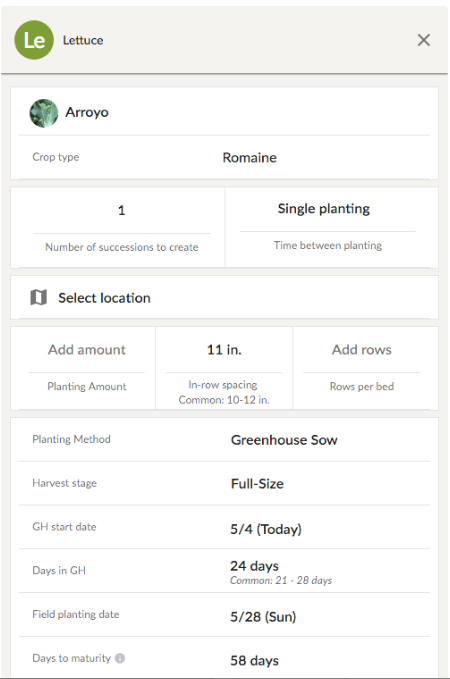
To help get you started, Tend is pre-populated with growing information —such as in-row spacing and days in greenhouse—for some of the most popular crops.
Tend also calculates days to maturity (DTM) value for some crops based on the variety and planting method you choose; these values will be automatically adjusted based on seed catalogue recommendations if you switch planting methods (e.g. direct sowing to transplanting).
Remembering your data
Any updates you make to Tend’s default crop data are saved and subsequently used to populate the crop data the next time you add that crop.
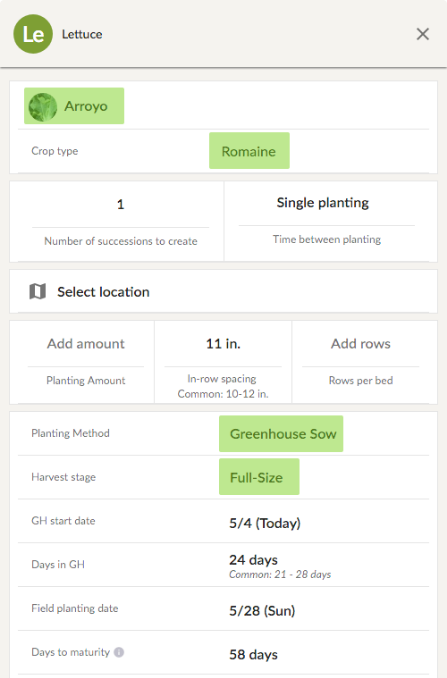
Because there are many ways to grow a crop, Tend stores your data as a combination of five key fields:
Crop (e.g. Lettuce)
Variety (e.g. Arroyo)
Crop Type (e.g. Romaine)
Planting Method (e.g Direct Sow Transplant from Purchase, Greenhouse Sow)
Harvest Stage (e.g Full-Size or Baby-leaf)
For each combination of these five fields, Tend will store the data specific to the combination.
Putting it all together
With Tend, you only have to enter data once, after which it is saved until you decide to edit it. When you create new plantings, Tend will automatically load your saved data for the selected combination of Crop, Crop Type, Harvest Stage, Planting Method, and Variety.
The exception is that if you previously edited any of the data, and then updated one of the five key fields (described above), Tend will only populate the non-updated data.
Link to our explainer video. (make sure you are logged into your Tend account to view it)