
Tend has two separate mobile apps: Tend Companion App, the older app, and Tend Smart Farm, the newer, recommended app. You can use either app. Both are available for iPhone in the Apple App Store and for Android phones in the Google Play Store.
The desktop version of Tend is separate from both mobile apps. We recommend starting on desktop to add your crops and do your crop planning, then using a mobile app while working in the field.
Which Tend app are you using?
Check the app name on your phone and compare it with the screenshots below. Saying “Tend” or “the mobile app” does not identify which mobile app you are using.
Tend Companion App — older mobile app
Tend Companion App is the older Tend mobile app. It is a separate app from Tend Smart Farm. You can continue to use either app, but Tend Smart Farm is our recommended choice for getting started.
The following screenshots show Tend Companion App:
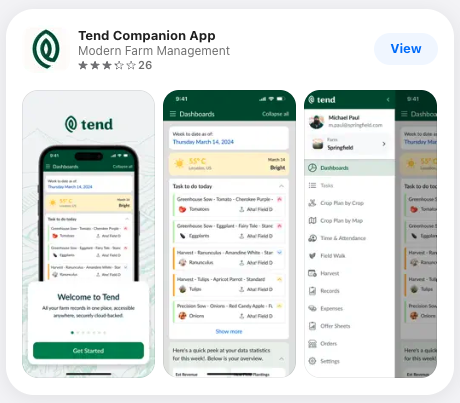
App shown above: Tend Companion App (older mobile app).
Tend Smart Farm — newer, recommended mobile app
Tend Smart Farm is the newer Tend mobile app and our recommended choice. It is a separate app from Tend Companion App.
The following screenshots show Tend Smart Farm:
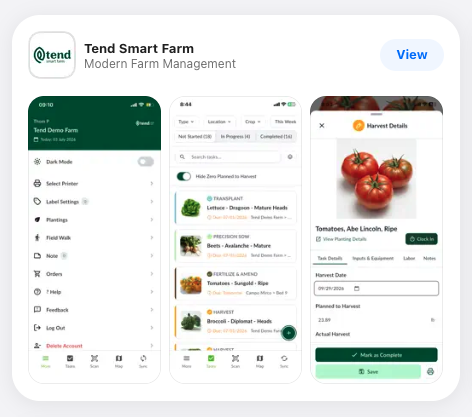
App shown above: Tend Smart Farm (newer, recommended mobile app).
When to use desktop versus mobile
Desktop Tend: Start here to add your crops and do your crop planning.
Mobile field work: Use a Tend mobile app for everyday field activities, including:
Creating, updating, and completing tasks.
Recording harvest amounts.
Clocking in and out of tasks.
This overview does not provide app-specific navigation steps. Screens and steps may differ between desktop Tend, Tend Companion App, and Tend Smart Farm.
Getting help with a mobile app
We do not currently offer active support through the mobile apps. Our support bot’s current how-to guidance covers the desktop version of Tend. Desktop instructions should not be assumed to apply to Tend Companion App or Tend Smart Farm, and instructions for one mobile app should not be assumed to apply to the other.
When asking for help, specify whether you are using desktop Tend, Tend Companion App, or Tend Smart Farm. For a mobile app, also include whether you use an iPhone or Android phone, what you are trying to do, and what happens. This helps us identify the correct app before providing guidance.