Order options in "Configuration" > "Store" are global option(s) that you can create to show on your cart page. This feature is great for things like adding a home delivery fee, rush shipping, or even linking to a policy or other page on your site (up-sells, anyone?)
Here's an example of an Order Option:
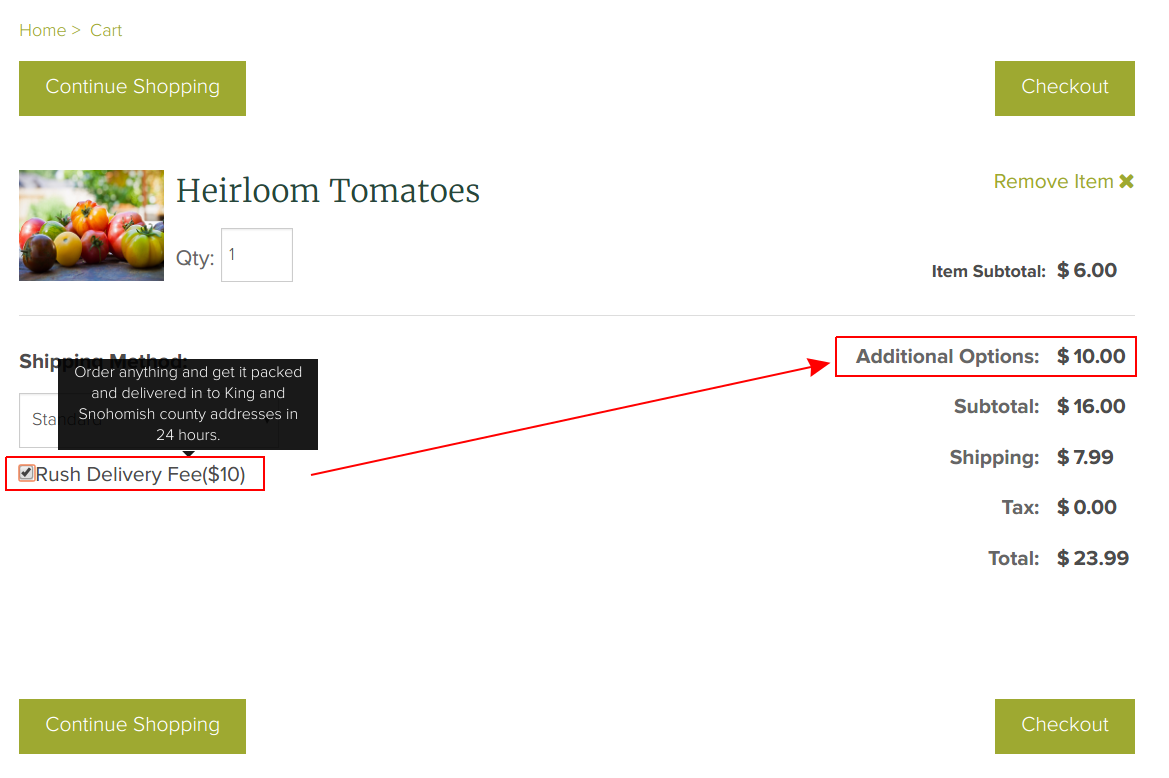
To create a new order option, or edit an existing one, visit your admin and click on "Order Options" in "Configuration" > "Store". Here are the editable fields you'll find there:
name: The name of the order option will be presented to the customer as a checkbox on the cart page.
order: Enter a number here to define the ordering of all order options on the cart page.
price: Enter a price here to charge an additional fee for this order option. If you leave it blank there will be no charge for selecting this option. For example, you may want to charge an extra $10 for gift wrapping.
required: Enter a price here to charge an additional fee for this order option. If you leave it blank there will be no charge for selecting this option. For example, you may want to charge an extra $10 for gift wrapping.
image: An image to show with this order option
link: This text will appear after the name of the option. Clicking this text will lead to the url you enter in the Link Destination field. If you enter nothing in this field there will be no link
link destination: When a customer clicks the text shown in the Link Text field they will be taken to the URL you enter here. You can enter absolute (http://www.tend.co/contact.html) or relative URLs (concat.html).
show text box when selected: Select this if you'd like a textbox to appear when the customer selects this order option. For example, you may want to show a "Gift Message" textbox when a customer selects a "Gift Wrapping" option.
label for text box: This will be shown alongside the textbox that appears with the order option. This will only appear of "Show Textbox when Selected" is selected.
description: You can enter a more lengthy description for this order option if it is not made apparent by the name. This will appear as a tooltip when the customer hovers over an order option.
Order options will always appear on your customers cart page, right before checkout. For a live example, visit demo.tend.ag and add a product to your shopping cart.