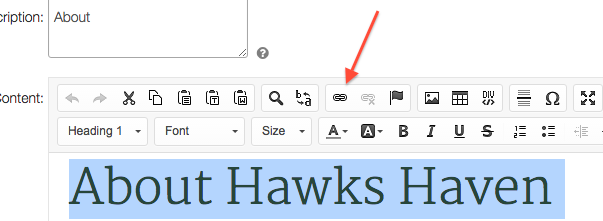
Creating a link inside one of your pages that links to internally on your site is different than creating an external link. Here's how to do it:
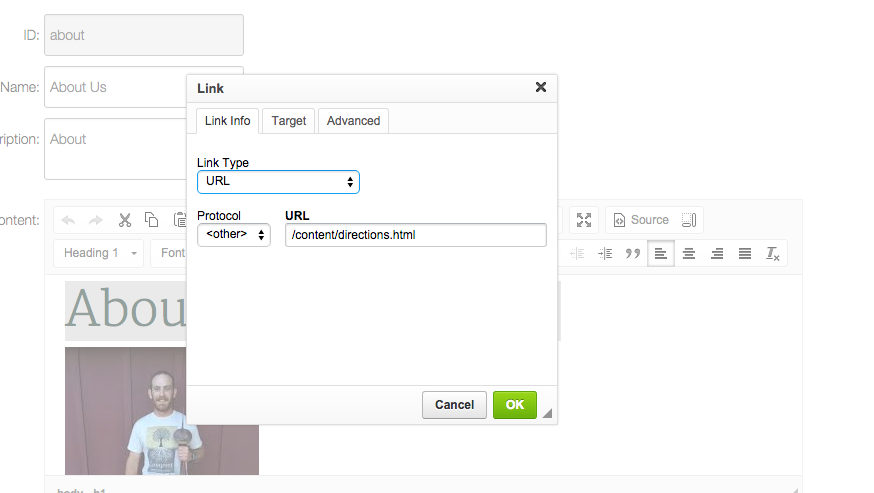
You'll first need to highlight the text you want to link and then select the small chain icon in the rich text editor. A small popup will appear where you will then enter the URL you'd like to link to. In this popup, you'll see 3 fields (link, protocol, and URL). When linking internally you'll enter the following information in these fields:
Link Type: URL
Protocol: "<other>"
URL: Enter everything in the URL AFTER your domain name. For example, if linking to your "Directions" page, you'd enter: "/content/directions.html" and NOT "www.domainname.com/content/directions.html"
It's important to remember to enter the URL as everything after your domain name and not to include your domain. Just to reiterate, another example, if linking to your blog, would look like this: "/blog.html".